
Creative banner design ideas: 5 techniques to try
Explore five creative banner designs for ideas on color, product placement and layout. Study a technique in each example, then describe it in your own banner brief.
The gallery starts with three product banner designs from Talha Hussain's Web Banner Design project so you can compare his color and layout choices. Fazle Rabbi's automotive set and Drummyfish's pixel-art promotion show two different approaches. Each image links to its creator and source license.
1. Sneaker banner design: match the background to the product
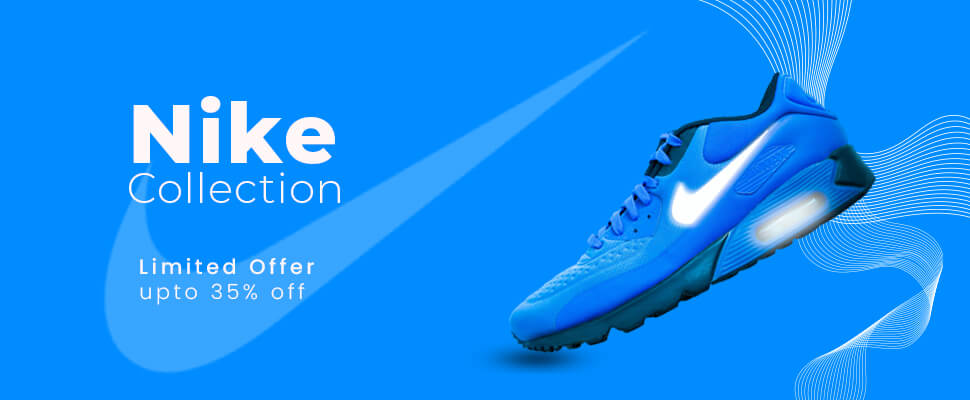
The designer matches the background to the shoe, then uses white type and the white swoosh to separate the main elements. The diagonal product angle gives a wide, static composition a sense of movement. Thin curves add detail around the shoe while the left side stays open for the headline.
Try in your own design: Choose a background color taken from your own product. Keep enough contrast around its edges, then check that the headline remains readable at the size you will use.
2. Smartphone banner design: give the product name priority
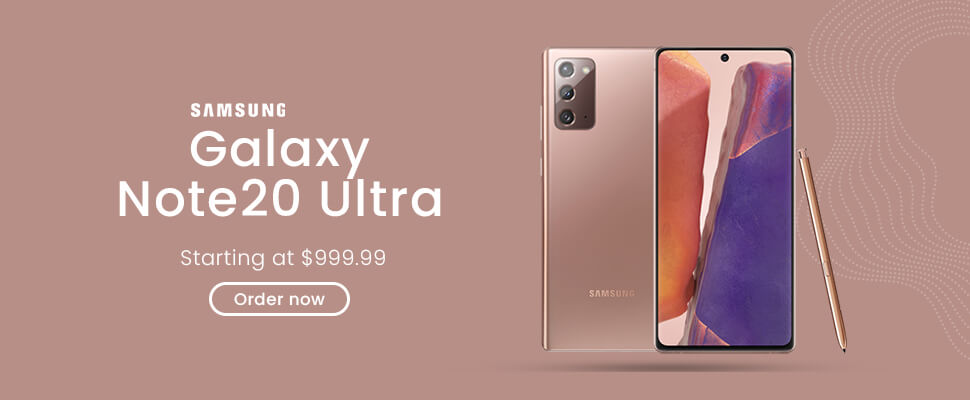
The rose background echoes the phone finish. The designer places the product name on two large lines, with a smaller price below and a simple outlined button. Front and back views show two sides of the device without a row of separate feature illustrations.
Try in your own design: Give the product name, price and action different levels of emphasis. Use a quiet background when the product photograph already contains detail.
3. Product banner color variants: keep the layout recognizable
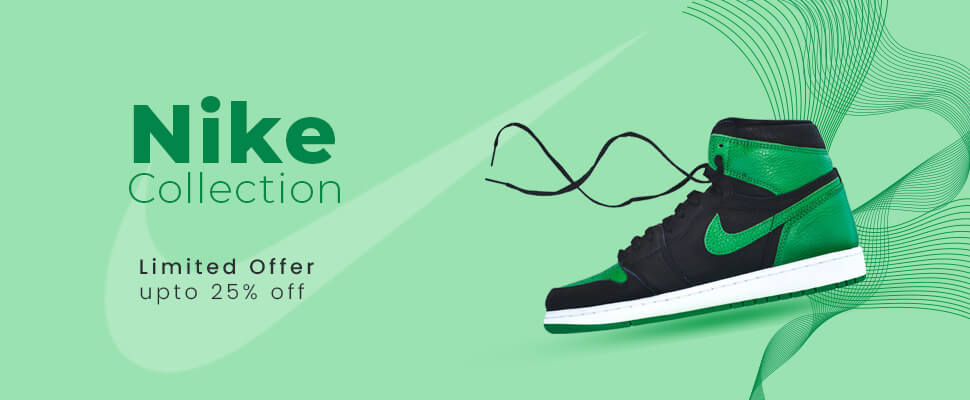
In the same project, the designer uses a mint background and dark green text for a different sneaker. The product stays on the right and the collection message stays on the left. Compared with the blue version, the darker headline changes the contrast while the layout remains recognizable.
Try in your own design: Keep a few layout anchors when you build a related set. If you compare variants in a campaign, control the offer and other variables; these two portfolio images also change the product and discount.
4. Automotive banner design: adapt the offer to each format
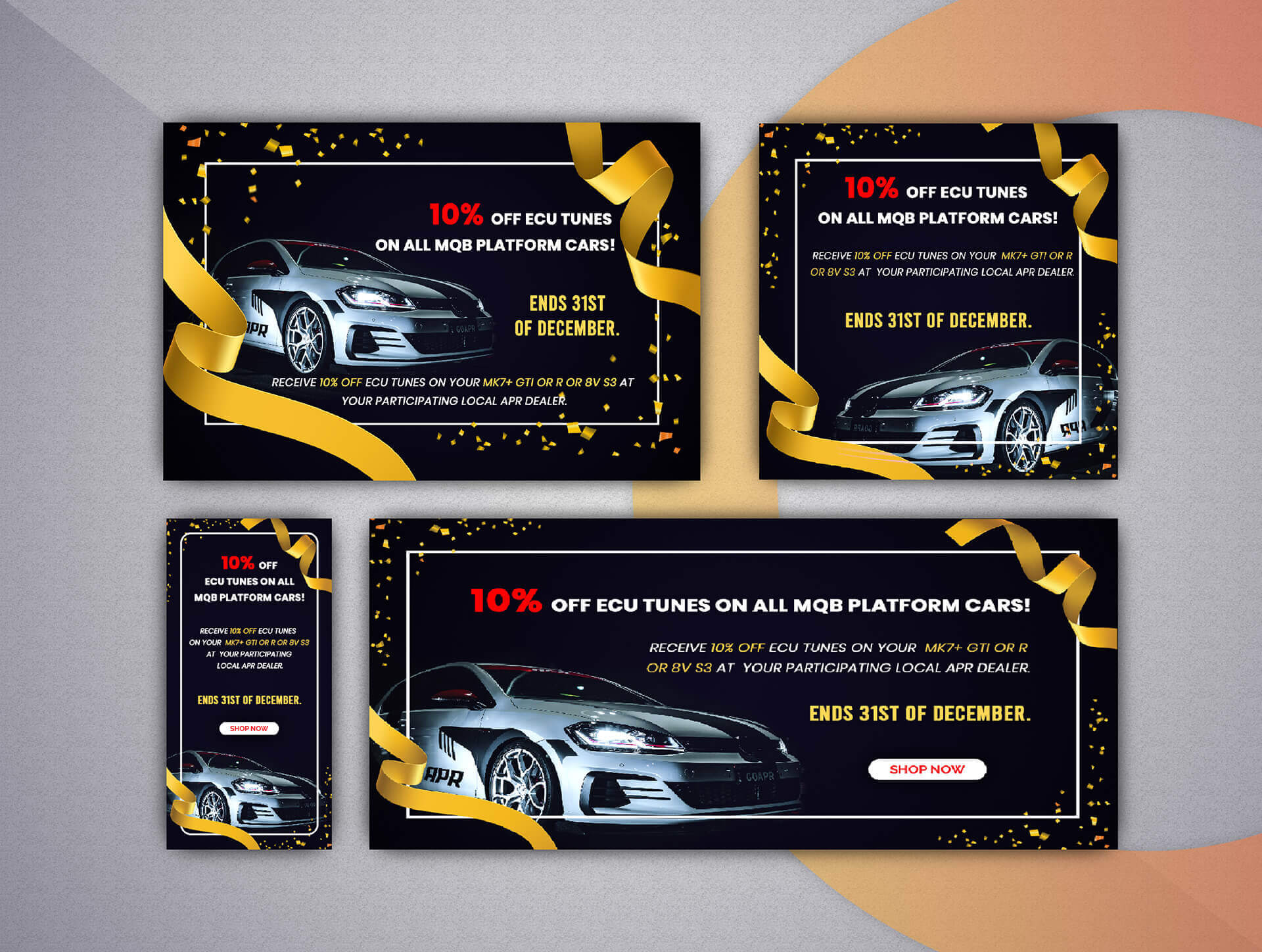
This portfolio presentation shows several banner shapes together. The designer repeats the dark background, gold ribbons, car image and red discount, but changes their positions. In the tall version, the offer sits above the vehicle; the wide version puts them side by side.
Try in your own design: Plan the tall and wide layouts separately. Preserve the main visual cues, then edit supporting text so the smallest format stays readable. Treat the decorative frame as optional if it crowds the offer.
5. Pixel-art banner design: choose a style that fits the subject
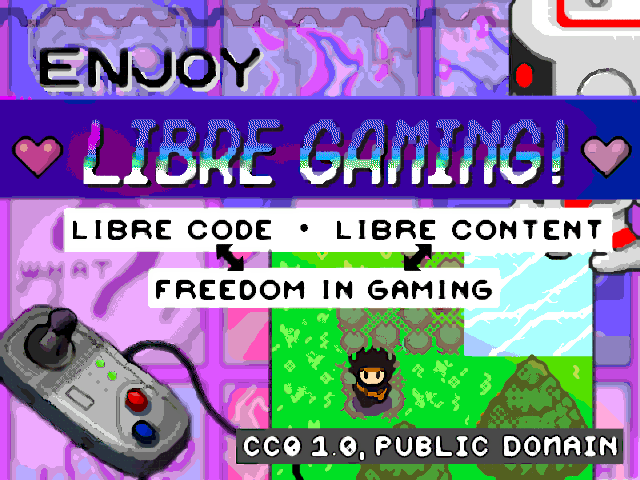
Drummyfish combines a controller, a game scene and pixel lettering in a dense purple-and-green composition. The author describes these as promotional graphics for free software and free culture, including use inside games, and supplies both small and enlarged versions.
Try in your own design: Choose a visual style that belongs to the subject. Pixel art fits this gaming message, but the number of text strips would need a fresh layout for a narrow placement.
Turn a reference into your own banner brief
Pick one detail you want to explore, such as a background that matches the product or a large product name with a small price. Write down the customer, offer and next action before you start arranging the image. Use your own brand assets and photographs you have permission to use.
A useful brief might say: “Use our blue running shoe as the main subject, leave room on the left for one benefit and make a separate layout for the tall format.” Add your actual offer, CTA and required formats. Our ad banner prompt guide shows how to write that direction as a complete prompt. Use the brand consistency guide to specify your own logo, palette and fonts.
For messages and layout sketches, see our Google Display ad examples. For dimensions, use the banner size guide. These portfolio images have their own dimensions; do not assume that a full-width website banner or a presentation image meets an advertising platform's upload requirements.
Creative banner design questions
What makes a banner design creative?
A specific visual choice that helps communicate the offer: a product angle, a distinctive color relationship or an illustration style suited to the audience. Start with the message, then choose one idea to emphasize. A design can look distinctive without proving that it performs well in a campaign.
What size should a web banner be?
Choose the size for the intended placement before you build the final artwork. A website header, a social-feed image and a fixed-size display ad need different compositions. Use the Google Display banner size guide for that ad format, then check your campaign's current requirements. A portfolio presentation can contain several sizes in one image.
How do I make a banner design stand out?
Give one product or message the most visual space, separate it from the background and make the next action easy to find. Review the banner at its intended display size. Remove details you cannot read, and compare a new version against your existing creative using a defined creative testing question.
Image credits and reuse
Talha Hussain's Web Banner Design and Fazle Rabbi's Car Sale Web Banner Design declare CC BY-SA 4.0. Drummyfish shares Freedom Promotion Banners/ads under CC0 1.0. We credit the creators beside each image and note web re-encoding where it applies. The cover illustration is original AdflowKit artwork.
These are portfolio designs and a promotional graphic, with no verified campaign results or brand endorsement. Displayed prices and deadlines are historical examples. Source licenses cover the rights the contributors can grant; check separate rights to product photos and trademarks before using them in your own ads. CC BY-SA requires attribution, a license link and an indication of changes, with ShareAlike for shared adaptations. Source licenses checked October 30, 2026; image licenses apply separately from the article copyright.